Invoices and receipts are sorted into your folder structure—ready for month-end close.
Know the moment a client sends their documents, so nothing waits until the deadline.
Route client files into your firm’s Shared Drive so every accountant on the team has access.
Search in DriveMy DriveAccountingCompany ABC
Accounting
Company ABC
Invoices3 newBills
Gmail
Hi, someone just used your uploader!
Google Chat
Hi, someone just used your uploader!
Slack
Hi, someone just used your uploader!
Search in DriveShared DriveCompany ABCInvoices
PDFinvoice-0001
WesleyPatriciaEmily
From uploaded document to a row in Google Sheets automatically
Automatic document processing
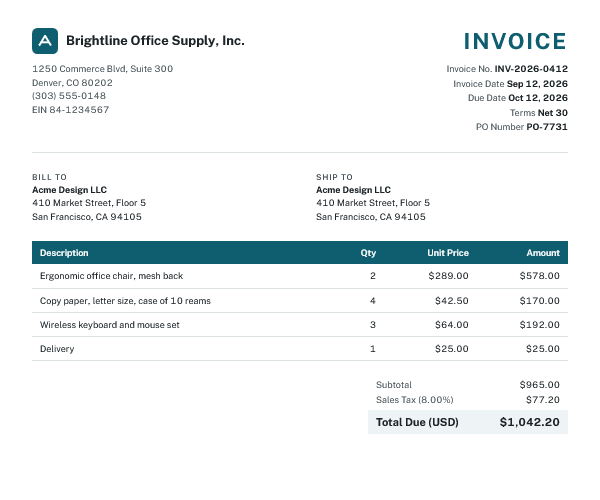
Brightline Office Supply, Inc.
1250 Commerce Blvd, Suite 300 Denver, CO 80202 (303) 555-0148 EIN 84-1234567
INVOICE
Invoice No. INV-2026-0412 Invoice Date Sep 12, 2026 Due Date Oct 12, 2026 Terms Net 30 PO Number PO-7731
Bill toAcme Design LLC410 Market Street, Floor 5 San Francisco, CA 94105
Ship toAcme Design LLC410 Market Street, Floor 5 San Francisco, CA 94105
Description
Qty
Unit Price
Amount
Ergonomic office chair, mesh back
2
$289.00
$578.00
Copy paper, letter size, case of 10 reams
4
$42.50
$170.00
Wireless keyboard and mouse set
3
$64.00
$192.00
Delivery
1
$25.00
$25.00
Subtotal$965.00
Sales Tax (8.00%)$77.20
Total Due (USD)$1,042.20
NOTICE: thermal paper. Print may fade with heat, sunlight or plastic sleeves. Store at or below 77 °F. Expected print life 5 yrs under the conditions above.
For tax records please keep a copy of this receipt.
FILL UP & SAVE 10¢/GAL WITH REWARDS
MAPLE RIDGE FUEL, INC.
2100 W Wabash Ave, Springfield IL
Station #417 - Springfield, IL
Date of sale: 09/14/2026 07:14:45
Receipt no. 2026/417/00011270
Payment: DEBIT MASTERCARD
**** **** **** 0693
Auth code: 719315 Seq: 005:815:006
POS ID: PVTB6417 (C) 09/14/26 07:14 AM
Contactless
ItemGallons$/galTotal
=============================================
UNLEADED 8712.4813.45943.17
Pump 04
*RECEIPT 11270 TOTAL (USD)43.17
=============================================
SubtotalTaxTotal
43.170.0043.17
---------------------------------------------
Maple Ridge Fuel, Inc.
EIN: 36-4785512
2100 W Wabash Ave
Springfield, IL 62704
Federal and state fuel taxes included in price per gallon.
Thank you and have a safe trip!
請求書
Acme Design LLC御中
下記の通りご請求申し上げます。
ご請求金額¥128,700-
請求日 2026年10月15日 請求書番号 INV-2026-1015
株式会社さくらデザイン〒150-0002 東京都渋谷区渋谷2-21-1 TEL 03-1234-5678 登録番号 T1234567890123さくら デザイン
W-2s, 1099s and 1098s from your clients, collected in one place for tax season.
Sheet columns
Form type
Tax year
Issuer
Issuer TIN (last 4)
Recipient
Recipient TIN (last 4)
Main amount
Federal tax withheld
State
State tax withheld
Notes
Form type, Tax year, Issuer, Issuer TIN (last 4), Recipient, Recipient TIN (last 4), Main amount, Federal tax withheld, State, State tax withheld, Notes
Collect W-9s from vendors and contractors. Get tax classification and 1099 status in one sheet.
Sheet columns
Legal name
Business name
Tax classification
Exempt payee code
TIN type
TIN (last 4)
Address
City
State
ZIP code
Signed
Signature date
Form revision
1099 reportable
Notes
Legal name, Business name, Tax classification, Exempt payee code, TIN type, TIN (last 4), Address, City, State, ZIP code, Signed, Signature date, Form revision, 1099 reportable, Notes
Uploading is free. Free uploaders stay open for 24 hours, then you can create a new one anytime. Want one
permanent link per client? Add a plan from $4.99/month.
DriveUploader is a document collection tool for accountants and bookkeepers. Clients upload invoices, receipts and bank statements through a link or email address without creating an account. Files are saved to your Google Drive, and AI extracts the data into Google Sheets.
No. Clients open your upload link in any browser or on their phone and upload files without signing in. They never get access to your Google Drive.
Yes. Uploads go straight to your Google Drive and no copies are stored on our servers. Files are encrypted in transit, and you can set an expiration date or a password for each uploader.
Yes. Give each client a dedicated email address. Every attachment they forward is saved straight to their folder in your Drive, which works well for vendors that send invoices automatically.
Yes, through Google Sheets. Every document becomes a row in your sheet, which you can export as CSV or Excel and bring into QuickBooks, Xero or most other accounting software with its import tool. Want a direct integration with the software you use? Let us know and we’ll prioritize it.
Uploading is free. You pay only when AI processes a document: 1 credit = 1 document, from $0.09 per document in the 100-credit pack down to $0.03 with 5,000 credits. Credits you buy never expire, and every free account gets 3 AI credits each month.
Your uploaders keep accepting files and saving them to Google Drive. AI processing pauses until you buy more credits.
Clients can upload any file type, and DriveUploader doesn’t limit file size on any plan. AI reads PDFs, photos and scans (JPG, PNG, GIF, WebP), Word documents and text files. You can limit file types or set a maximum file size for each uploader.
Stop chasing documents this month
Create your first client uploader in 2 minutes. Your clients won’t need to learn anything new.


 DriveUploader