DriveUploader allows you to upload files directly to a Google Shared Drive instead of a personal “My Drive” folder. This is useful when working with teams, departments, or shared projects.
When a Shared Drive is selected as the destination, all uploaded files will be stored in that Shared Drive and accessible to its members according to Google Drive permissions.
Before you start
To upload files to a Shared Drive:
- Your Google account must have access to the Shared Drive.
- You must have permission to upload files to that Shared Drive.
- The uploader owner must select the Shared Drive as the destination folder.
Shared Drive uploads are available on the PRO and TEAM plans.
Selecting a Shared Drive as the upload destination
- Log in to your DriveUploader account.
- Go to My uploaders.
- Open the uploader you want to configure.
- Navigate to the General tab.
- In the Destination folder section, choose a folder inside the Shared Drive.
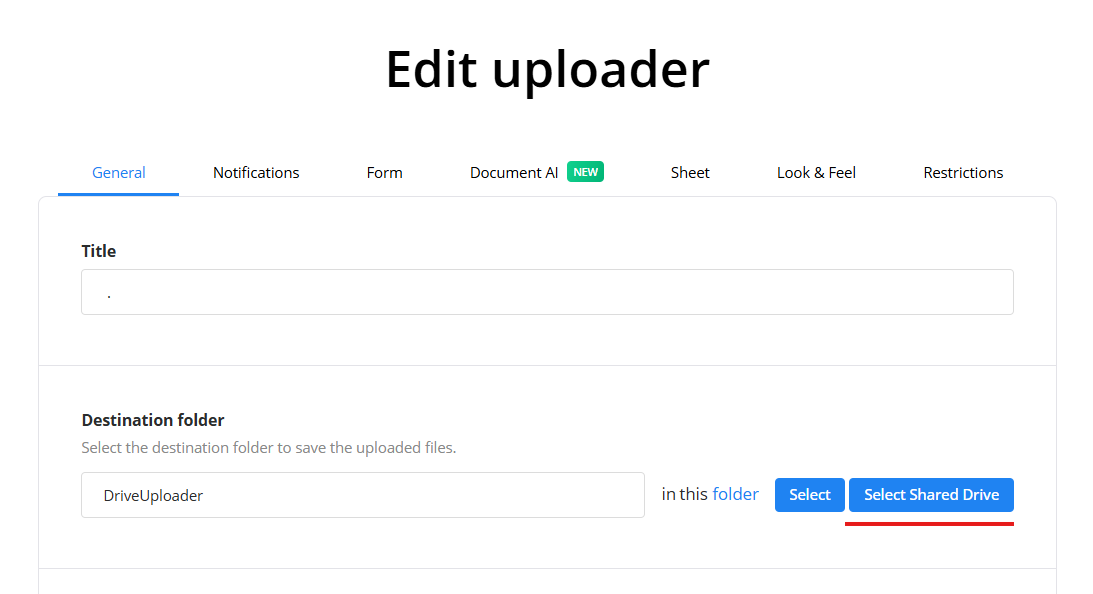
Once selected, all uploaded files will be saved to that Shared Drive location.
